Motivanforderungen & Druckdaten richtig anlegen
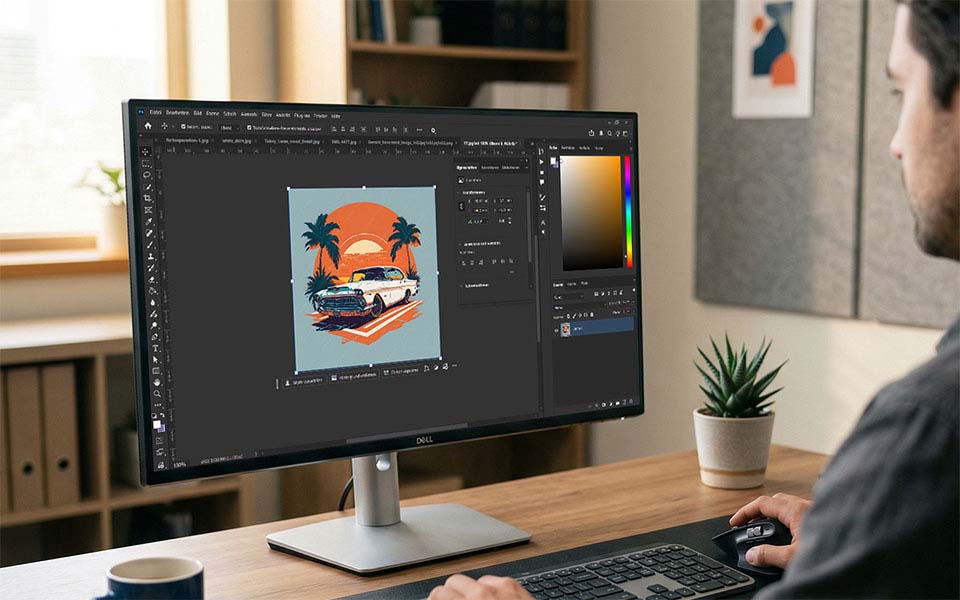
Die Qualität deiner Druckdatei hat direkten Einfluss auf das spätere Druckergebnis. Je sauberer das Motiv angelegt ist, desto besser lassen sich Farben, Details und Konturen im Druck umsetzen.
Grundsätzlich können Druckdaten als Vektordatei oder als Pixelgrafik angelegt werden. Wenn dein Motiv in beiden Formaten vorliegt, ist eine Vektordatei immer die bessere Wahl. Für den Siebdruck ist sie je nach Motiv sogar zwingend erforderlich, etwa wenn Farben sauber separiert oder feste Druckstandards eingehalten werden müssen. Auch Logos, Schriftzüge und Grafiken mit klaren Flächen sollten nach Möglichkeit als Vektordatei angelegt werden.
Ideal ist es, wenn dein Motiv bereits in der gewünschten Druckgröße vorbereitet ist, die Farben möglichst nah am späteren Druckergebnis liegen und der Hintergrund entfernt wurde. Ein freigestelltes Motiv erleichtert die Weiterverarbeitung und sorgt insbesondere im Digitaldruck für ein sauberes Ergebnis.
Alle Druckdaten werden bei uns vor der Produktion kostenlos professionell geprüft. Wenn notwendig und technisch möglich, nehmen wir kleinere Optimierungen vor.
Allgemeine Anforderungen an Druckdaten
Unabhängig vom Dateiformat gilt: Je sauberer die Druckdatei angelegt ist, desto reibungsloser läuft die Produktion. Achte deshalb auf folgende Punkte:
- Motiv möglichst in der gewünschten Druckgröße anlegen
- Hintergrund nach Möglichkeit entfernen
- Farben sauber und eindeutig anlegen
- Schriften nicht als bearbeitbaren Text belassen
- keine unnötigen Effekte, Masken oder Transparenzen verwenden
- nur hochwertige Originaldateien verwenden
Unscharfe Vorlagen, kleine Webgrafiken oder nachträglich hochskalierte Dateien führen in der Regel nicht zu einer besseren Druckqualität. Eine Datei sollte deshalb immer in der bestmöglichen Ausgangsqualität angelegt oder exportiert werden.
Vektordateien
Vektordateien sind für viele Druckmotive die beste Grundlage. Sie lassen sich ohne Qualitätsverlust skalieren und sind besonders gut für Logos, Schriften, Piktogramme und grafische Motive mit klaren Kanten geeignet. Für den Siebdruck sind Vektordateien oft die bevorzugte oder erforderliche Basis, weil sich Farben sauber trennen und Motive drucktechnisch präzise umsetzen lassen.
Wichtig ist, dass alle Schriften und Texte vor dem Export in Pfade beziehungsweise Kurven umgewandelt werden. Nur so ist sichergestellt, dass es beim Öffnen der Datei nicht zu Darstellungsfehlern kommt.
Geeignete Dateiformate für Vektordaten sind:
- .eps
- .ai
- .cdr bis Version X3
Typische Programme zur Erstellung von Vektorgrafiken sind:
- Adobe Illustrator
- CorelDRAW
- Scribus
- Inkscape
Falls dir keine Vektordatei vorliegt, prüfen wir gerne, ob dein Motiv auch auf anderer Basis verwendbar ist. Wenn eine Vektorisierung nötig ist, können wir diese für 35 € brutto pro Motiv übernehmen.
Pixelgrafiken
Pixelgrafiken eignen sich vor allem für Fotos, detailreiche Illustrationen oder Motive mit weichen Verläufen. Entscheidend ist hier vor allem die Auflösung. Für ein sauberes Druckergebnis empfehlen wir 300 dpi in der gewünschten Druckgröße.
Dateien aus Webseiten sind meist nicht druckgeeignet, da sie häufig nur mit 72 dpi vorliegen. Auch ein nachträgliches Vergrößern verbessert die tatsächliche Qualität nicht.
Für den digitalen Direktdruck und den Rastersiebdruck sollten Pixelgrafiken im RGB-Farbraum angelegt sein. Ein transparenter Hintergrund beziehungsweise ein freigestelltes Motiv ist empfehlenswert und bei Digitaldruck auf farbigen Textilien in vielen Fällen erforderlich.
Außerdem gilt:
- Ebenen sollten gerastert sein
- Effekte und Füllmethoden sollten fest reduziert werden
- Masken sollten nicht enthalten sein
- die Datei sollte auf eine Hintergrundebene reduziert sein
- Halbtransparenzen und Alpha-Kanäle sollten vermieden werden
Halbtransparenzen erkennst du häufig daran, dass sich Farben je nach Hintergrund sichtbar verändern. Solche Effekte lassen sich im Druck nicht immer zuverlässig umsetzen und sollten deshalb vor dem Export entfernt werden.
Geeignete Dateiformate für Pixelgrafiken sind:
- .png
- .jpg
- .tiff
Typische Programme zur Erstellung von Pixelgrafiken sind:
- Adobe Photoshop
- GIMP
Besonderheiten im Siebdruck
Beim Siebdruck gibt es zusätzliche Anforderungen, damit feine Details im Druck sauber stehen bleiben und Farben korrekt umgesetzt werden können.
Achte darauf, dass Linien und grafische Elemente nicht zu fein angelegt sind. Die Strichstärke sollte mindestens 1 mm betragen. Andernfalls kann es passieren, dass Farbe zuläuft oder feine Elemente im Druck wegbrechen.
Auch Schriften sollten ausreichend groß angelegt sein. Als Orientierung gilt:
- Arial mindestens 30 Punkt
- Arial Fett mindestens 20 Punkt
Für die Farbangabe im Siebdruck arbeiten wir mit Pantone Solid Coated. Die Druckfarben werden aus 14 Grundfarben angemischt, wodurch über 1000 Farbtöne ohne Aufpreis möglich sind. Wenn für dein Motiv oder Firmenlogo feste Pantone-Werte definiert sind, kannst du diese im Bestellprozess angeben. Erfolgt keine konkrete Angabe, wählen wir den Pantone-Wert, der dem Farbton deiner Druckdatei am nächsten kommt.
Wichtig ist dabei: Aktuell können Pantone-Werte nur bis 7547C angemischt werden.

Die wichtigsten Anforderungen im Überblick
Für eine schnelle Orientierung solltest du bei deinen Druckdaten vor allem auf diese Punkte achten:
- Vektordatei bevorzugen, besonders bei Logos, Schriften und Siebdruck
- 300 dpi bei Pixelgrafiken in Endgröße
- freigestelltes Motiv beziehungsweise transparenter Hintergrund
- RGB-Farbraum für digitalen Direktdruck und Rastersiebdruck
- keine Masken, Halbtransparenzen oder unnötigen Effekte
- Schriften in Pfade umwandeln
- Ebenen und Effekte sauber reduzieren
- nur hochwertige Ausgangsdateien verwenden
Wenn keine perfekte Druckdatei vorliegt
Nicht jede Datei ist von Anfang an druckfertig. Deshalb prüfen wir jede Druckdatei vor der Produktion kostenlos. Wenn kleinere Anpassungen möglich sind, übernehmen wir diese direkt im Rahmen des Datenchecks.
Wenn du keine Vektordatei hast, können wir dein Motiv bei Bedarf vektorisieren. Falls du unsicher bist, ob deine Datei für den Druck geeignet ist, kannst du sie uns auch vorab zur Prüfung senden.